01 / REMOTE INTERPRETERS
The stage at the venue. The booth in a browser.
Send stage audio and video to your interpreters. Receive their languages in production and route them to a mixer, a web audience, or both.
Explore remote interpretation → VOXVENTREMOTE INTERPRETATION. NO STRESS.
INTERPRETATION & MULTILINGUAL AUDIO
Connect remote interpreters. Or deliver translations already available at your venue to audience smartphones. VoxVent connects the stage, interpreters and listeners through a Mac or Windows production app.
1 production room · 2 languages · 1 interpreter · 5 web listeners
60 cumulative minutes a day. Transmission stops at the daily limit.
FROM THE STAGE TO YOUR AUDIENCE
Diagram of the two use cases; not an app screenshot.
TWO WAYS TO USE VOXVENT
01 / REMOTE INTERPRETERS
Send stage audio and video to your interpreters. Receive their languages in production and route them to a mixer, a web audience, or both.
Explore remote interpretation →02 / ON-SITE INTERPRETERS
Capture the original and interpreted feeds from your audio interface. Participants open a link or QR code and listen on their phones with headphones.
Explore smartphone listening →Professional interpreters remain central. VoxVent provides the connection and audio distribution; interpreting services are not included.
WHAT YOU CAN USE TODAY
Configure a paid licence in the portal: card payment or bank transfer. Activation follows payment confirmation; bank transfers require verification. The licence provides software capacity, not interpreting staff or an operated event service.
Use remote interpreters or send existing venue translations to smartphones. We regularly release new features and improvements. Agree availability, capacity and a rehearsal on your equipment before a live event.
MAIN/backup requires candidate app versions and an agreed two-computer rehearsal. It is not a guarantee of uninterrupted audio. AI captions and translation remain a separate development project, outside this offer.
Technical preparation and event assistance are separate paid services, by appointment. Request scope and price before booking.
YOUR FIRST TEST, IN THREE STEPS
Register and confirm your email, then sign in. Choose two languages and download the production app from the portal.
Use an audio interface for the stage and any on-site translations. Prepare stage video for remote interpreters too.
Open the link on a phone with headphones. Check the audio, network and complete signal path before your event.
FOR THE PEOPLE INTERPRETING
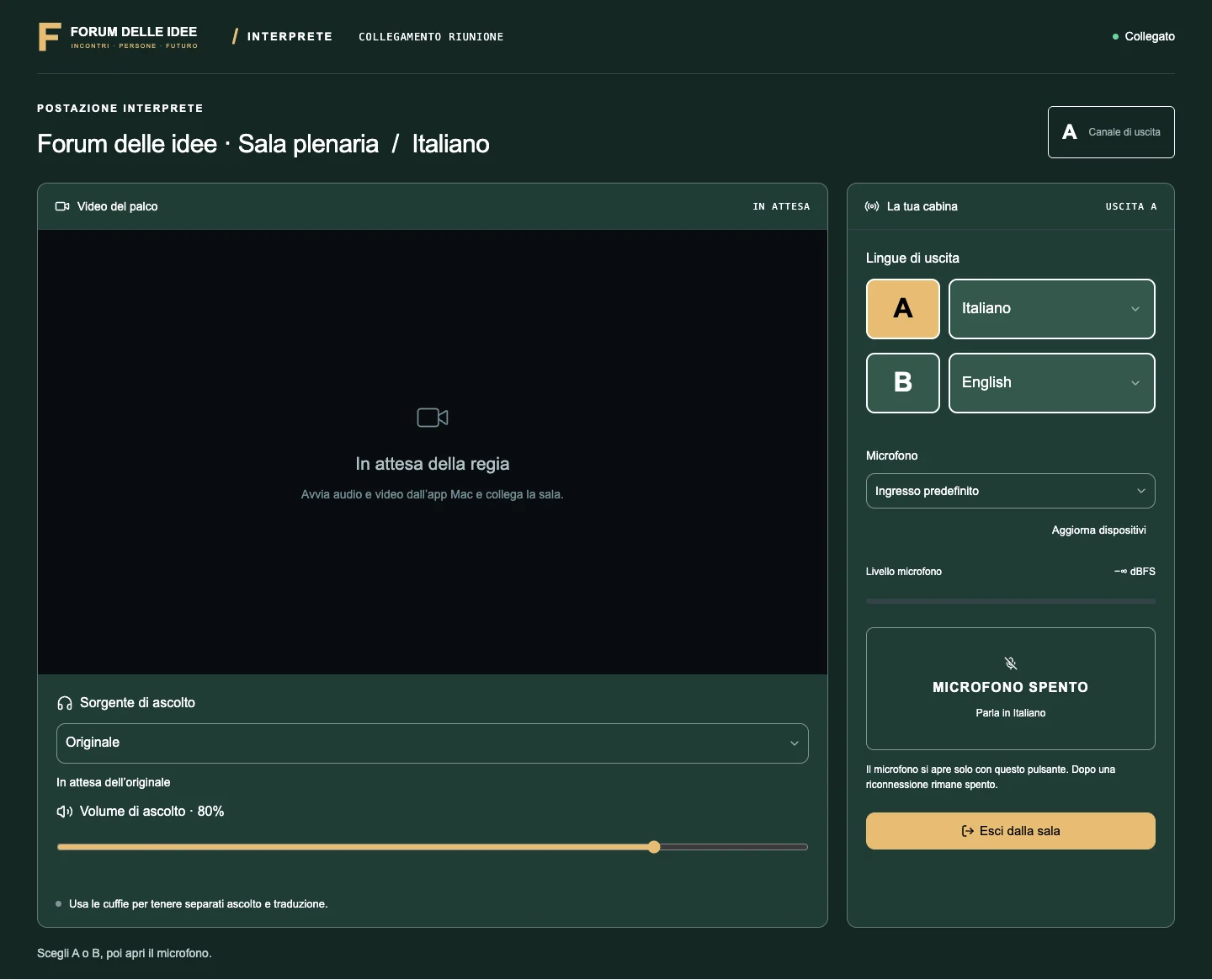
The browser booth brings together stage video, original audio, A/B selection and microphone controls. The interpreter works in a browser while the technician manages production.
Your event logo and colours accompany the listening page. Share the public link, generate a QR code or embed players in your event website, subject to the features of your licence.
VOXVENT STUDIO / MAC + WINDOWS
Audio inputs, separate language returns and assignable outputs keep venue distribution under your control. If you only use physical outputs, you do not need to purchase web-listener capacity.
Public downloads: Mac 0.21.4 (macOS 13.3+, Apple M1 or later; no Intel Mac) and Windows 0.11.4 (Windows 10/11 x64, WDM). The apps receive new features and improvements. Installation may display security warnings: follow the portal instructions. Check your actual audio interface and routing before the event.
MAIN/backup is experimental and uses separate candidate builds. Contact us before planning it; the standard downloads listed here are not the backup release.
04 / PRICING
The first production room costs €49 for one day and includes 2 languages of your choice, with up to two interpreter workstations. From the third language, the first additional language costs €19 for one day. Save more as you add production rooms and languages, with further discounts for longer periods. The preceding day is included for testing. Prices exclude VAT.
Audio outputs from the production app to a mixing console, speakers or in-room listening systems do not use web listener capacity. If you add a production room to an active licence, you can select zero and share the listener capacity you already purchased. With zero available places, web listening is blocked. Once capacity is full, new listeners can join only if extra listeners on demand are enabled. Production desks and interpreters are also excluded from audience counts.
Two languages of your choice included in every production room. ITA ↔ ENG, FRA ↔ ENG or any other pair: the price is the same. ITA, ENG and FRA are three languages, so one is an additional paid language. The original stage signal is an audio source, not a separate licence item.
Active configured licences for the same customer add their production rooms, languages, interpreter workstations and listener capacity together. Audience capacity is shared across all rooms: 1 annual production room with 1,000 listeners + 1 one-day production room without listeners = 2 production rooms and 1,000 listeners in total for that day. Each purchase keeps its own expiry date.
If they run at the same time: 3 production rooms, each with two languages included: €49 + €39.20 + €31.85 = €120.05 + VAT per day, with up to 2 interpreter workstations per room, 6 in total. Web listeners are excluded from this example. If the rooms run one at a time, capacity for 1 production room with two languages is enough: €49 per day.
Choose one to seven days, two weeks, one calendar month or one calendar year. The preceding day is included for testing. First production room: €179 for one week, €349 for one month, €999 for one year. From the second production room and additional language: −20%, then −35%, −45%, −55%, and −60% from the sixth. No hourly allowance. Pay by card through Stripe or by bank transfer. Card purchases activate after payment confirmation; bank transfers activate after receipt is verified. For weekly, fortnightly, monthly and annual licences, you can authorise automatic card renewal and disable it from your account.
Web listeners: reusable concurrent places, with no hourly allowance. First place: €0.75 for one day, €4.99 for one month, €19.99 for one year. The discount is 15% from place 101, 25% from place 501 and 35% from place 1,001, applied only to places within each band.
The total concurrent peak of web listeners, including iframe players, is counted across all production rooms on the account. Only with “Extra listeners on demand” enabled, settlement adds the places above the allowance at each daily peak, using Italian time: €0.90 per excess place per day (€0.75 daily rate +20%). Extra listeners require a card and authorisation for automatic charges in the portal, with invoice creation. Automatic extra charges are not available with bank transfers. Production rooms and interpreter workstations remain within purchased capacity.
1 day · 1 room · Italian / English
€49.00 + VATProduction €49.00 + additional languages €0 + web €0. No web listening enabled. Physical outputs feed your mixer.
1 day · 1 room · Italian / English · 100 concurrent listeners
€124.00 + VATProduction €49.00 + additional languages €0 + web €75.00 (100 × €0.75).
1 day · 3 rooms · Italian / English in each · 300 concurrent listeners overall
€322.55 + VATProduction €120.05 (€49 + €39.20 + €31.85) + additional languages €0 + web €202.50 (first 100 × €0.75; next 200 × €0.6375).
Each room includes two configurable languages and up to two interpreter workstations. The 300 listeners are shared across rooms, not 300 per room. Each example includes the preceding rehearsal day, no extra audience usage and no optional services. Interpreting staff, hardware, connectivity and technical assistance are excluded. Existing licences and optional extras can affect the capacity available to your account.
START FOR FREE
1 concurrent production room, 2 configurable languages, 1 interpreter station and up to 5 simultaneous web listeners. 60 cumulative minutes of connected production per account per day, including silence. Stops and reconnections do not reset the allowance. It resets at midnight Europe/Rome.
No card required and no automatic charges. At the daily limit, production stops. Activate a paid licence when you need more time or capacity.
Partner testing is a separate, complimentary licence assigned by an administrator, with agreed capacity and an expiry date, without an hourly allowance. Paid licences retain the included rehearsal day.
How VoxVent licences work →Already registered? Sign in directly. Missing the email? Check spam or use “Resend verification”.
Create a free account ↗SEPARATE SUPPORT SERVICES
Remote services for one room, by appointment. Interpreters, equipment rental and venue connectivity are excluded.
Prices exclude VAT. Interpreters, hardware and connectivity are excluded. Availability and capacity are agreed before the event.
MAIN + BACKUP / EXPERIMENTAL
The new VoxVent Studio builds add a backup workstation for the same room, included in the same licence. MAIN starts transmitting first; the reserve can then connect. Manual handover and automatic takeover are implemented, with full two-computer verification still to be completed.
Candidate versions: Mac 0.22.1 and Windows 0.12.0. Software checks do not certify real-world handover times. A full two-computer test with an interpreter booth, audio/video and mixer remains to be completed; agree the version and rehearsal with us.
FROM THE BLOG / PRACTICAL GUIDES
Two computers, one room and the same licence: explore VoxVent backup production, MAIN-first setup and the checks to run before a multilingual event.
Read the guide →Discover the VoxVent web player: language selection, pause and return to live audio, an optional original channel and pre-event checks.
Read the article →Already have interpreters and an on-site system? Explore the VoxVent Mac workflow for distributing original audio and translations to attendees’ phones.
Read the article →FAQ
No. Participants open the web player using a link or QR code. They need a compatible device, Internet access and headphones. Test the venue network with representative phones before a live event.
The service described here distributes professional interpreters’ audio or feeds from an existing system. AI captions and translation are in development and are not included in this offer.
Yes. Languages can leave the production audio interface for a mixer or venue system. These physical outputs do not consume web-listener capacity.
Send us the date, rooms, languages and expected audience. Availability, capacity and a technical rehearsal are agreed before the event. Interpreters, hardware and connectivity are excluded.
THE NEXT CONVERSATION CAN START WITH YOU.
Start with the date, rooms, languages and expected audience. We will help assess whether VoxVent fits your workflow and how to prepare a test.
info@receventi.itTell us your date, number of rooms, languages and expected concurrent listeners.
Questions about languages, listeners or your first setup? Read the practical guide →